Download
XNN Translate for Windows.
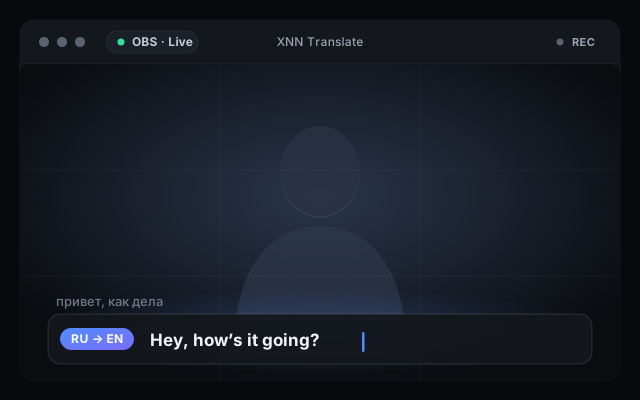
Real-time, private captions and translation, rendered on your own GPU and ready for OBS. Nothing leaves your machine — the model runs locally.
Code-signed by XNN LLC via Azure Trusted Signing -- Windows shows the real publisher (XNN LLC). As a brand-new release it may still trigger a Windows SmartScreen reputation prompt; choose Run anyway. Verify the SHA-256 checksum before you run it.
01 What you get
Live captions, translated on your own GPU.
- Real-time captions & translation. Speech is transcribed and translated as it happens, low-latency, ready to overlay on a stream.
- Built for OBS & streaming. A clean caption source you can drop straight into your scene.
- Private & on-device. The model runs locally on your hardware — audio and transcripts never leave your machine.
02 First run
One-time model download.
On first launch the app fetches its translation models (about 3 GB) from the server and shows a progress bar while they download. After that everything runs locally — no further downloads, no connection required for captions.
03 System requirements
What you need.
- Windows 10 or 11 (64-bit)
- A dedicated GPU (NVIDIA recommended) for real-time performance
- ~3 GB free disk space for the downloaded models
- An internet connection for the one-time model download
04 Other platforms
macOS & Linux.
- macOSIn preparation
- LinuxNot in the first release
Want a heads-up when these land? Leave your email.
Install, update, and recover
Confirm the signer and checksum before install, then use the in-app update path for later releases. Model-package and update failures can be retried without downloading a different installer.
Download trust checks
- Windows installers are code-signed by XNN LLC (Azure Trusted Signing), so Windows shows the verified publisher. A brand-new release may still hit a Windows SmartScreen reputation prompt — choose Run anyway; it clears as the release builds reputation.
- Every download shows a SHA-256 checksum before install.
- First launch downloads the local model package separately. If that download is interrupted, reopen the app and retry it there.
- App updates are offered inside XNN Translate and signature-checked before installation. If Windows does not restart the app, reopen it normally.
- If installation, the model package, or an update keeps failing, open Support and review diagnostics before sharing a support bundle.
- Release notes explain what changed in the latest stable build.